All about Computers & Mobile Downloads......
Tips & Tricks for Computers and Mobiles
Mobile Applications & Games....
Computer Related Softwares & Tips N Tricks and Tweaks for PCs
All information located under current site placed for private purposes and will not be downloaded, viewed or used whatsoever. So current site webmaster or organization hosting this site takes no responsibility for the way you will use information from this site. If you’re member of any anti-piracy or related group or organization you cannot enter this site and view any of site contents. If you enter this site and do not agree with current terms you can not provide any treatment of our hosting ISPs, organization or any persons storing this site information because your actions will be estimated as violation code no. 431.322.12 of the Internet Privacy Act from 1995.
Increase your earnings.............
Friday, May 11, 2007
Hi, mGinger.com pays you to read ads on your cellphone! These ads are only about your interests. Not only that, you get to decide when you want these ads. Based on my calculations I can easily make enough money to free up my cell phone bill. Check it out... http://www.mginger.com/index.jsp?inviteId=72709 See how much you can make. Have fun calculating...and sign up. You will like it... -Admin
As had been anticipated, the N800 bears a high resemblance to its older sibling, the 770. Key changes include: addition of a VGA-resolution web cam; microphone moved to a more phone-friendly position; two full-size SD card slots, instead of a single RS-MMC slot; built-in stereo speakers, instead of a single speaker; scroll rocker for web page scrolling; redesigned top-mounted buttons and 5-way cursor pad; built-in stand; and a few mechanical tweaks.
One frequent complaint with the earlier 770 tablet was the device's limited internal memory capacity of 64MB RAM and 64MB available flash. The N800 ups the RAM to 128MB, and increases the flash memory to 256 MB (with around 80 MB reportedly occupied by the device's standard Linux software stack), according to Nokia's director of open source, Dr. Ari Jaaksi. Another significant change is that instead of the 770's single RS-MMC (reduce-sized MMC) slot, the N800 provides a pair of full-sized SD card slots, which Nokia says are usable with SD, MicroSD, MiniSD, MMC, and RS-MMC cards, in capacities up to 2GB. Cards such as RS-MMC require the use of a small adapter.
In addition to substantial memory increases (RAM and flash), the N800's processor speed has also been upgraded, according to Jaaksi. The N800 is based on a TI OMAP 2420 SoC (system-on-chip), rather than the 770's OMAP 1710. While he didn't specify the processor's clock rate, the N800's processor is rumored to be clocked at 320 MHz, as compared to the 770's 220 MHz. The resulting performance enhancement is sure to be appreciated.
The N800 measures 5.7 x 3.0 x 0.5 inches and weighs 7.3 ounces, as compared with 5.5 x 3.1 x 0.7 inches and 8.1 ounces for the 770. The 4.1-inch touchscreen display retains the much-praised 800 x 480 pixels resolution of the earlier model.
Despite changes to the hardware, the N800 has much in common, from a software perspective, with the 770. Details on the 770's software stack are available in our comprehensive Nokia 770 Internet Tablet Device Profile, and information on the 2006 update to the 770's software appears here. The N800's OS, meanwhile, is dubbed "Internet Tablet OS 2007 edition." Presumably an OS 2007 version for the 700 tablet will also be forthcoming.
According to Jaaksi, key differences between the N800's OS 2007 Linux software stack and the 770's OS 2006 include: Updated Opera 8 browser Vidoecalls Proper podcast support Unspecified UI improvements Intelligent connectivity that remembers how you want to get connected "...and many others."
In other news, a Nokia development team in Brazil recently created a nifty finger-driven music player for the 770 Internet tablet and likely the N800 also. The "Canola" application combines UPnP renderer and control point functionality, enabling it to transparently detect UPnP repositories such as consumer NAS devices, and then index and render/play their photo, music, and video resources.
Also, 802.11 specialist DeviceScape recently launched a software utility and service capable of automating WiFi logins at thousands of commercial hotspots.
Key features Access the web on a portable internet tablet High-resolution widescreen display Opera 8 Flash 7 Internet communications Internet calling with integrated web camera Instant messaging Email client Full-screen finger keyboard Access to internet media at home and on-the-go High quality stereo speakers Media player UPnP architecture Expandable mass memory Operating system Internet Tablet OS 2007 edition Key applications (additional applications available) Web Browser (Opera with Flash player (v7) Internet calling with video Instant Messaging Email Media player Internet Radio RSS Feed Reader Connectivity Auto-connection to saved Wi-Fi hotspots or through Bluetooth compatible phone Display functions Zooming, full-screen, and panning functionality Utilities Application installer PDF viewer Sketch File manager Backup/restore Image viewer Notes Calculator Input methods Full screen finger keyboard On-screen keyboard Handwriting recognition Size Volume: 137 cc Weight: 206 g Dimensions: 75 x 144 x 13 (/1 mm Color Silver front cover and matte black back Display High-resolution touch screen (800 x 480 pixels) with up to 65,536 colors Memory RAM 128 Flash 256MB, 128 MiniSD with extender included in sales package Two internal memory card slots, compatible with SD, MicroSD, MiniSD, MMC, and RS-MMC. Compatible with cards up to 2GB. Configurable up to 4GB. Form and function High quality stereo speakers and sensitive microphone High-resolution widescreen display Integrated desk stand for on-table use Ergonomic keys for internet usage Supported file formats Audio: AAC, AMR, MP2, MP3, RA (RealAudio), WAV, WMA Image: BMP, GIF, ICO, JPEG, PNG, TIFF, SVG-tiny Video: 3GP, AVI, H.263, MPEG-1, MPEG-4, RV (Real Video) Internet radio playlists: M3U, PLS Connectivity WLAN: 802.11b/g Bluetooth specification: 2.0. For internet connection and file transfer via phone Profiles supported: Dial-up Networking, File Transfer, Generic Access, SIM Access, Object Push Profile, Human Interface Profile, and Serial Port profiles USB 2.0 high speed device mode for PC connectivity Sales package contents Nokia N800 Internet Tablet (RX-34) Extra stylus Battery (BP-5L) 128MB MiniSD card with extender (MU-17) Stereo headset (HS-4) Travel charger (AC-4) Pouch (CP-136) Data cable (DKE-2) Quick start guide Safety, warranty, and other product information Language User Interface: British English, French, German, Italian, Spanish, American English, Brazilian Portuguese, Canadian French, Latin American Spanish, Danish, Swedish, Finnish, Russian, Dutch, Norwegian, Portuguese User Guide: British English, French, German, Italian, Spanish, American English, Brazilian Portuguese, Canadian French, Latin American Spanish, Danish, Swedish, Finnish, Russian, Dutch, Norwegian, Portuguese, Arabic Power managementBattery Browsing time Standby time BP-5L Up to 3.5 hours Up to 12 days
As had been anticipated, the N800 bears a high resemblance to its older sibling, the 770. Key changes include: addition of a VGA-resolution web cam; microphone moved to a more phone-friendly position; two full-size SD card slots, instead of a single RS-MMC slot; built-in stereo speakers, instead of a single speaker; scroll rocker for web page scrolling; redesigned top-mounted buttons and 5-way cursor pad; built-in stand; and a few mechanical tweaks.
One frequent complaint with the earlier 770 tablet was the device's limited internal memory capacity of 64MB RAM and 64MB available flash. The N800 ups the RAM to 128MB, and increases the flash memory to 256 MB (with around 80 MB reportedly occupied by the device's standard Linux software stack), according to Nokia's director of open source, Dr. Ari Jaaksi. Another significant change is that instead of the 770's single RS-MMC (reduce-sized MMC) slot, the N800 provides a pair of full-sized SD card slots, which Nokia says are usable with SD, MicroSD, MiniSD, MMC, and RS-MMC cards, in capacities up to 2GB. Cards such as RS-MMC require the use of a small adapter.
In addition to substantial memory increases (RAM and flash), the N800's processor speed has also been upgraded, according to Jaaksi. The N800 is based on a TI OMAP 2420 SoC (system-on-chip), rather than the 770's OMAP 1710. While he didn't specify the processor's clock rate, the N800's processor is rumored to be clocked at 320 MHz, as compared to the 770's 220 MHz. The resulting performance enhancement is sure to be appreciated.
The N800 measures 5.7 x 3.0 x 0.5 inches and weighs 7.3 ounces, as compared with 5.5 x 3.1 x 0.7 inches and 8.1 ounces for the 770. The 4.1-inch touchscreen display retains the much-praised 800 x 480 pixels resolution of the earlier model.
Despite changes to the hardware, the N800 has much in common, from a software perspective, with the 770. Details on the 770's software stack are available in our comprehensive Nokia 770 Internet Tablet Device Profile, and information on the 2006 update to the 770's software appears here. The N800's OS, meanwhile, is dubbed "Internet Tablet OS 2007 edition." Presumably an OS 2007 version for the 700 tablet will also be forthcoming.
According to Jaaksi, key differences between the N800's OS 2007 Linux software stack and the 770's OS 2006 include: Updated Opera 8 browser Vidoecalls Proper podcast support Unspecified UI improvements Intelligent connectivity that remembers how you want to get connected "...and many others."
In other news, a Nokia development team in Brazil recently created a nifty finger-driven music player for the 770 Internet tablet and likely the N800 also. The "Canola" application combines UPnP renderer and control point functionality, enabling it to transparently detect UPnP repositories such as consumer NAS devices, and then index and render/play their photo, music, and video resources.
Also, 802.11 specialist DeviceScape recently launched a software utility and service capable of automating WiFi logins at thousands of commercial hotspots.
Key features Access the web on a portable internet tablet High-resolution widescreen display Opera 8 Flash 7 Internet communications Internet calling with integrated web camera Instant messaging Email client Full-screen finger keyboard Access to internet media at home and on-the-go High quality stereo speakers Media player UPnP architecture Expandable mass memory Operating system Internet Tablet OS 2007 edition Key applications (additional applications available) Web Browser (Opera with Flash player (v7) Internet calling with video Instant Messaging Email Media player Internet Radio RSS Feed Reader Connectivity Auto-connection to saved Wi-Fi hotspots or through Bluetooth compatible phone Display functions Zooming, full-screen, and panning functionality Utilities Application installer PDF viewer Sketch File manager Backup/restore Image viewer Notes Calculator Input methods Full screen finger keyboard On-screen keyboard Handwriting recognition Size Volume: 137 cc Weight: 206 g Dimensions: 75 x 144 x 13 (/1 mm Color Silver front cover and matte black back Display High-resolution touch screen (800 x 480 pixels) with up to 65,536 colors Memory RAM 128 Flash 256MB, 128 MiniSD with extender included in sales package Two internal memory card slots, compatible with SD, MicroSD, MiniSD, MMC, and RS-MMC. Compatible with cards up to 2GB. Configurable up to 4GB. Form and function High quality stereo speakers and sensitive microphone High-resolution widescreen display Integrated desk stand for on-table use Ergonomic keys for internet usage Supported file formats Audio: AAC, AMR, MP2, MP3, RA (RealAudio), WAV, WMA Image: BMP, GIF, ICO, JPEG, PNG, TIFF, SVG-tiny Video: 3GP, AVI, H.263, MPEG-1, MPEG-4, RV (Real Video) Internet radio playlists: M3U, PLS Connectivity WLAN: 802.11b/g Bluetooth specification: 2.0. For internet connection and file transfer via phone Profiles supported: Dial-up Networking, File Transfer, Generic Access, SIM Access, Object Push Profile, Human Interface Profile, and Serial Port profiles USB 2.0 high speed device mode for PC connectivity Sales package contents Nokia N800 Internet Tablet (RX-34) Extra stylus Battery (BP-5L) 128MB MiniSD card with extender (MU-17) Stereo headset (HS-4) Travel charger (AC-4) Pouch (CP-136) Data cable (DKE-2) Quick start guide Safety, warranty, and other product information Language User Interface: British English, French, German, Italian, Spanish, American English, Brazilian Portuguese, Canadian French, Latin American Spanish, Danish, Swedish, Finnish, Russian, Dutch, Norwegian, Portuguese User Guide: British English, French, German, Italian, Spanish, American English, Brazilian Portuguese, Canadian French, Latin American Spanish, Danish, Swedish, Finnish, Russian, Dutch, Norwegian, Portuguese, Arabic Power managementBattery Browsing time Standby time BP-5L Up to 3.5 hours Up to 12 days
LOS ANGELES (Reuters) - "Spider-Man 3" sold a record $59 million worth of tickets during its first day of release across North America, and is on track to break the industry mark for an opening weekend, according to estimates issued on Saturday by the film's distributor. The highly anticipated superhero saga opened in the United States and Canada on Friday, having already begun its international campaign on May 1. The North American one-day and opening-weekend records were held by Walt Disney Co.'s July 2006 smash "Pirates of the Caribbean: Dead Man's Chest," with respective sums of $55.8 million and $135.6 million. "Based on the first day's performance, the studio believes the film will deliver in the range of $135 million to $145 million in North America for its first three days of release," Columbia Pictures said in a statement.
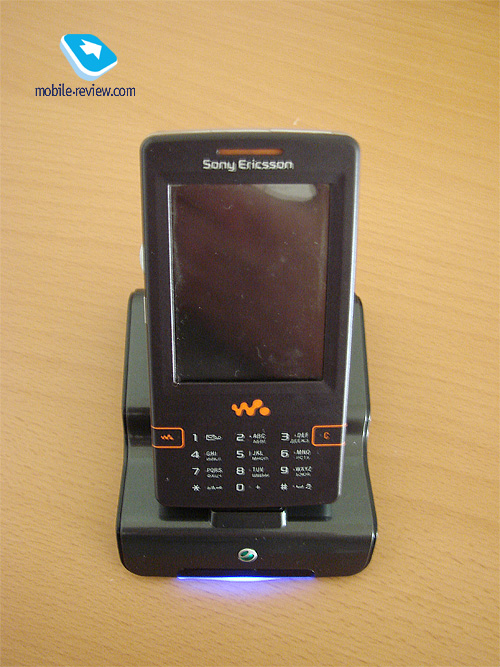
This February during the presentation of a new range of handsets, among which was the brilliant W880i, names of new Sony Ericsson-branded accessories were mentioned as well – a pair of new headsets, a Bluetooth-transmitter, a cradle and new speakers. As I promised earlier, reviews of all these widgets will be available on our portable in the near term, though the gadgets we have on our table today will be reviewed within one article. We are doing this firstly so as not to delve into unnecessary details (and not to force you to do that) and, secondly, these things are too quaint to be spoken about separately.
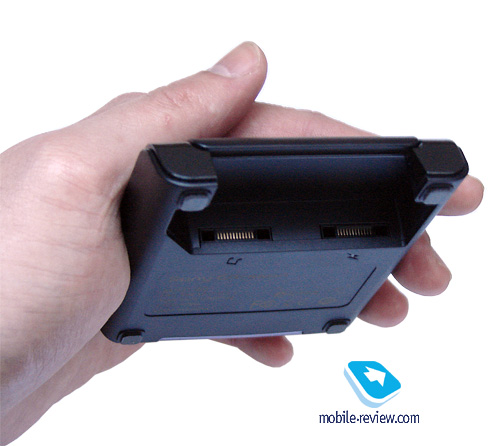
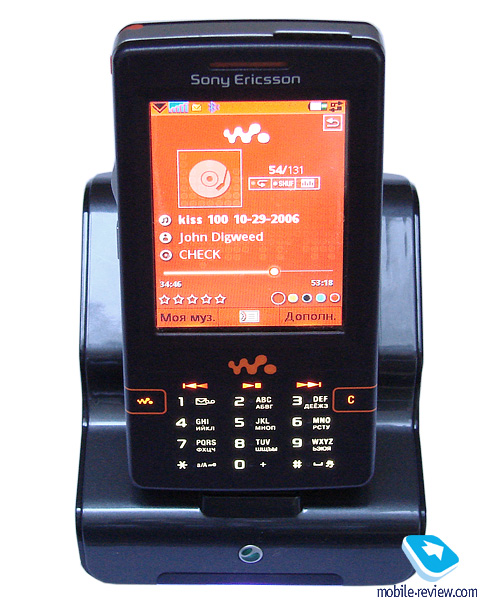
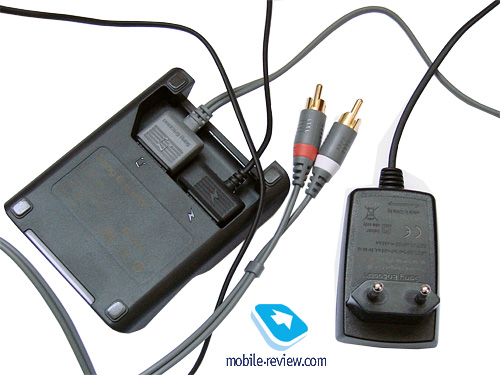
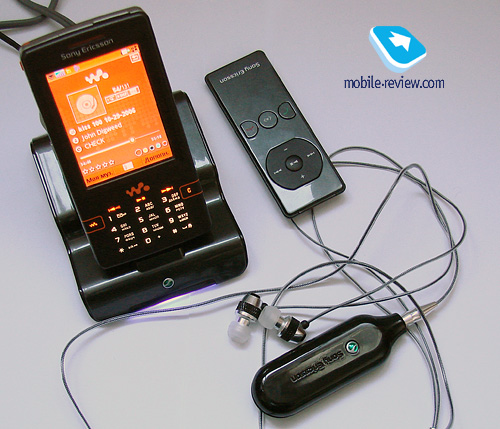
Well, let me begin with the music cradle MDC-60. In general it repeats the design of the previous devices of this kind, for example, the CDS-60, if we talk about the design. But the color is totally different – blackness suits the accessory very well. Moreover, when plugging a handset in the cradle violet backlighting flares up in its lower part, right at the place where the Infrared window is located. By the way, should you fit the device in an improper way, the backlighting will not gleam, such thing happened with me several times when I was trying the cradle with the W950i. The accessory’s underside is home to two Fast Port slots – one for connecting mains cord, and the other one for music cable, and USB cable won’t work out (which is a shame). As you probably know the company offers two types of music cables – MMC-60 with two plugs and MMC-70 with 3.5 mm jack; with this cradle either can be used. No matter what somebody would say, these accessories are quite available; it was not a one-time occasion when I came across then in markets, shops and etc.
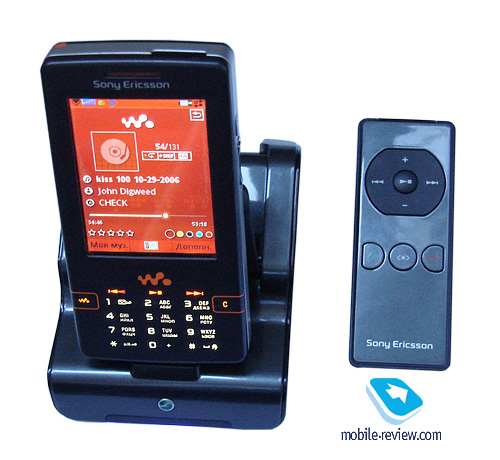
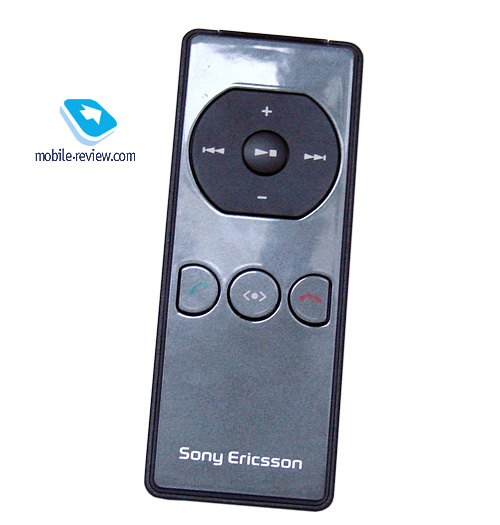
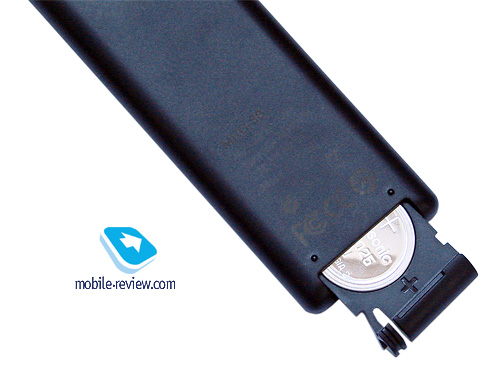
The cradle comes equipped with a remote control. It is modeled after the company’s trademark style, and is somewhat reminiscent of the remote for Sony Ericsson W950i. The device drains power from a round cell, you may change - to open its section just push the lock. Using this thing you can manage playback (Stop, Play, rewinding and volume control), launch radio (in pair with cradle it works quite well, perhaps the cradle doubles as an antenna). On top of that, you may answer or end a call via the keys with very familiar symbols. Unfortunately, I couldn’t turn on the speakerphone so I had to take the smartphone off the cradle to actually talk. The important detail is that the remote and cradle work even when no cable is linked up, meaning that it is a stand-alone device. What I really loved about it is that to start playback you should only press the key “Play” on the remote, without having to launch the handset’s player manually. At least, it worked for the W950i, I hope this will also hold true for other company’s handsets.
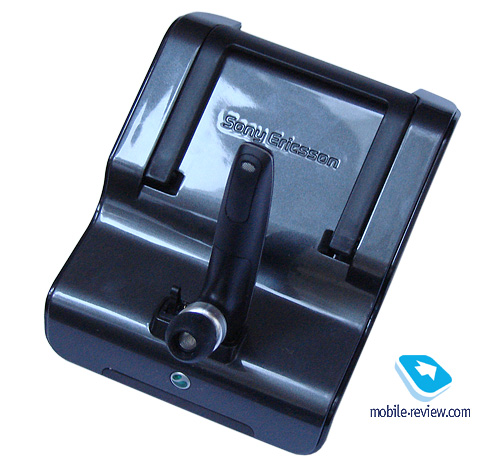
Now let’s imagine how it could be made best use of. Plugging the MDC 60 in a home stereo via the music cable and putting charger into the socket we’ll get charging-plus-music station, which is much likely to be not the first one in your home (for me it is quite so, as there is already a cradle near my notebook, and now I have one more next to the home stereo). Normally, you use it in the following way: put the phone in, press “Play” and enjoy the sound via your stereo’s speakers. The remote’s effective range is limited to 1-2 meters so won’t have an opportunity to lie far away from the device. On the other hand, pressing keys on the handset is even less convenient. By the way, with the cradle you can charge other types of accessories, for example headsets, as you can see it in the picture, there is nothing wrong with it. I should say a few words about the devices which the MDC-60 can properly work with – a dig at the W880i, which has its socket on a spine. While there is a good chance that you will actually connect it, I doubt it will look great.
Perhaps, that is all I could say about technical side. Now let us try to figure out, who and why would buy the MCD-60. I’m swaying more towards thinking that it would be the most desirable present for an owner of Sony Ericsson’s handset. Buying it for your own self is quite another matter, just come think of think, do you really need this charging dock, which, moreover, costs about 60-70 USD (no word on price yet, it is only my guess). On balance, look into it only in one case – if you are dying to plug your handset in the home stereo and listen to music in such way.
And it is all due to the device being way too exotic and, to some extent, lacking the final touch. Why didn’t the manufacturer tack small speakers onto the cradle and another USB socket? Then it would be been a kind of a do-it-all gadget, which wouldn’t bring any harm standing on your workplace, in the living room during a party or for no particular reason, or placed in the kitchen to let you have all favorite tunes one click away.
On the other hand, I do realize that I’m a spoilt consumer - Sony Ericsson is rejoicing all gadget aficionados like no one else and can afford releasing just about anything. Undoubtedly, it will eventually hit its target audience. Sony Ericsson MBR-100
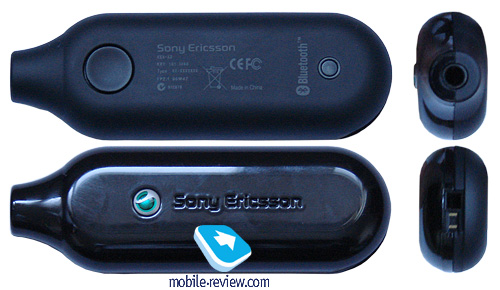
The company has already one similar widget in its portfolio - transmitter MMR-60 operating on FM frequency range. As some of you might know, the MMR-60 gets linked up to the handset and transmits songs on a certain frequency from the handset to your home stereo, car stereo and so on. The novelty we about to break down works in a totally different way, sharing only one thing in common with the MMR-60 – being a medium between the headset and your home stereo. This Bluetooth-receiver is plugged into a sound source (car stereo, for example) via audio jack (3,5 mm), than you link up your handset to it and listen to music via speakers. Simple? Aye; to pair them up, you should press and hold the key on the accessory back until you see the indicator twinkling in red and green. With the W950 coupling delivered no problems, nor did anything else – music was beamed properly, the sound quality, as I’d expected, was mediocre. Also I tried to get the MBR-100 in gear in car, my impressions of quality are one line above. One more thing, if someone calls you music gets paused and you should answer the call in the usual manner. In would seem, what kind of “thingy” is that! But don’t get overwhelmed with these thought just right now, as you can to plug in the MBR-100 custom headphones and get, in fact, a basic Bluetooth stereo headset, though, there will be not way for answering the calls with this. But it is alright, for this purpose you may always use handset. Of course, you will lose control over playback, however it is nothing – you can manage with music using the handset’s keys. Dear readers, what I’m going to tell you next may seem quite strange to you, but I put aside my beloved DS - 970, connected V-moda Vibe headphones to the MBR-100 and… enjoyed not only quality but the battery life as well. According to the manufacturer the device lasts about 12 hours in playback mode and about 300 hours in standby. In practice it put up about 5 days with occasional shut-downs for periods of inactivity at 1-2 hours of music every day. Looks good? No, it is excellent!
By the way, I’d like to note that when the MBR-100 is linked up to a home stereo, you may use a Bluetooth-headset – there is nothing wrong with that, probably, profile 2.0 is used.
The device comes included with standard charger for Fast Port, connecting cables: one with 3.5 mm pin, the other one with 3.5mm and 2RCA.
Design-wise, the MBR-100 isn’t altogether bad, its black streamlined casing looks very authentic put next to various gadgets.
The MBR-100 retails for about 65 USD, I strongly recommend it to all owners of handsets equipped with A2DP-profile, mainly in order to use it together with own headphones. In the case of non-Sony Ericsson-branded devices you’d better test the coupling capability before purchase. I repeat, in spite of being incapable of talking and managing playback, you will get a long-lasting gadget for listening to favorite tunes via custom headphones, which will be both cheap and reliable.
You could hear the sighs of total RPG satisfaction from the moment Bethesda announced that Elder Scrolls IV: Oblivion would be released on the PlayStation 3 console system. Oblivion has been, by all accounts, one of the best role-playing titles of the last few years, consuming gamers in a web of stellar gameplay, an intriguing story and top-notch graphics.
The only real questions were what would the PS3 port bring to the table. The answer, in short, is a lot.
Ok, back up a bit. Oblivion was already known for its huge world, massive storyline and great mechanics. As the game was already in the hands of 360 and PC gamers, Bethesda had to up the ante a bit to allow those who might have owned it on another system to wish to invest here. Ok, they added some more content, like the Knights of the Nine quest, a factional quest that will add another 10 hours or so to the already massive main quest.
For those who may not know, Oblivion is the continuation of stories that are part of the Elder Scrolls franchise. This particular tale begins in the province of Cyrodiil, part of the land known as Tamriel, where the Emperor (voiced by Patrick Stewart) is recounting the backstory of the land while forecasting his own death, as was part of his fate. He was, to all appearances, the last of his line, though his life is threatened by the forces of darkness – the same forces that have breached the gates to Oblivion and unleashed hellspawned demons upon the land.
The Blades, a highly trained personal guard of the Emperor, are trying to escort him to safety, but – as luck would have it – the path leads to a secret door in a dungeon cell … you know, the same dungeon you are occupying as the game begins. It seems that not only has the Emperor foreseen his own death, but you were part of the dream. And there is another heir to the throne, a bastard child known as Martin. The Emperor, before he dies, entrusts you with the pendant that is the mark of the royal line, and somehow may be tied to the defenses that protect the land from Oblivion. You are asked to seek out the heir.
Sounds simple, but it’s not.
The game is delivered in a very open-ended way. There is the main quest, of course, which takes anything but a direct route, and then there are wide arrays of side quests. For those who just want to get about the business of the main story, you don’t have to traverse the land by foot or mount. You can pull up the map and click on the location you wish to travel to and be whisked there as fast as you can say load time.
Oh, there are load times in this game, so do not expect a seamless experience.
On the way to seek out the heir, you are sidetracked by the fact that the town in which he resided was overrun by demonic forces that came through a gate to the realm known as Oblivion. You can’t get into town without first shutting the portal blocking the path. That means entering it and finding more quests inside the hellish environment in order to do all that is necessary to shut down that portal.
It’s all part and parcel of being an adventurer whose duty it is to save the same realm that threw you into a dungeon in the first place.
Creating your character is a satisfying experience. Not only can you customize the look, but the profession selection is rather robust and you can tailor your character to the way that you wish him or her to be. And that is just the start. As you use skills, they improve. Running down a hill and jumping improves acrobatic skills, for example. Having a shield to block attacks is also something that is hardily recommended. The AI in the game is very good. An archer, for example, won’t stand there and wait for you to charge and whack him with a sword. Nope, he shoots, and then gets distance in order to have time to shoot again. Annoying? You bet. Realistic? Yep. Challenging? Again, yep.
And as to the references to the main storyline … well, there is a central storyline, but Bethesda’s dev team didn’t just give the world that one facet. The game has several scenarios/stories going on. This is a finely-woven web of tales that serves to draw the gamer deeper and deeper into the world. You may find yourself wondering who can be trusted and how you really want to play your character. Decisions made do have repercussions. There are, sometimes, no right or wrong decisions, but rather decisions that may have consequences later on. This is the hallmark of a truly great story and game.
The control scheme is easy to use. The combat can happen in a hurry, and as you fight, you can experience, which leads to new skills.
When it comes to the graphics, Oblivion is absolutely glorious in its presentation. The environment details are absolutely delightful, the lighting is excellent and the world is very much alive. The latter element is hammered home by a great soundtrack that features great ambient sounds, a solid musical score and first-rate voice acting.
Some may gripe that the PS3 version lacks the downloadable content available for the 360 and PC, but when one considers the amount of game that is here, that seems like a minor complaint.
Elder Scrolls IV: Oblivion is easily one of the PS3’s premiere titles. The game has tremendous depth, is more than merely tasty eye candy, and delivers a role-playing fix that anyone who has a PS3, is an RPG fan, or just a gaming fan, should own.
The legacy continually gets deeper and more robust. From comic books to television, film to video games, Spider-man is a pop culture icon that simply cannot be ignored. Spider-man 3, the official movie game from Activision (in concert with Treyarch and Marvel) will merely add to the Webhead’s status. It is a grand adventure, full of surprises, and with a sandbox mission style that will allow gamers to explore the city and take the game at their individual pace.
But the game is not without a few missteps.
Ok, let’s get the “iffy” out of the way first. The camera is a royal pain. While it does a solid job, most of the time, in tracking Spidey, it can stop tracking at odd times or follow when the Wallcrawler is crawling along the walls, giving a distorted sense of which way is up. And fight styles that work on peons will not work on bosses. In one scenario you are taking on a host of bad guys, a gang known as Apocalypse. There is the boss and followers. For the followers you can web grab them and fling them around. You can double jump in the air, web them up to you, beat on them a bit and then powerbomb them into the pavement. That either reduces their health to nothing or eliminates them from the fight altogether. But that tactic does not work with the boss. In fact, he seems immune to most of the web attacks and strategies. And it is not just Apocalypse that is immune. Each boss you encounter has the same profile in that regard, which means that you will be evading, and then coming in from sides or back (or front if you hit the square button and avoid the attack), getting in a few shots (or more than a few – one fight scene saw Spidey string together a 22-hit combo – not that it did a lot of damage, but it was impressive) and then it is back to avoiding the attacks/evading the attacker.
And if you are not into playing a button-mashing title, you need not pick up this game. Spider-man 3 is a gorgeous game with cinematic moments, but this is a hardcore button-mashing title.
So much for the bad, now on to the good …
You want villains? This game is rife with them. From the Sandman to the New Goblin (a PS3 exclusive makes Harry, as the new goblin, playable) and from Venom (Spidey’s black suit) to Dr. Connors as the Lizard, as well as street gangs and subplots, you can’t go more than a few blocks over the massive (and seamless) map before you get the old Spidey sense pinging like a navy fleet searching for a submarine running shallow.
The plot to the game is very free form. You are in Manhattan and while there are several plot threads that weave throughout the game, you can choose which path you want to pursue. You use the controller’s R1 and L1 buttons to cycle through the available scenarios. Some of these are linear in nature and you will have to accomplish other tasks in order to open them up. The Apocalypse gang, for example, will have you in the subways (the game takes place above city streets, in the canyons created by the builds and in the subway system) fighting gang members and disarming bombs. The gang is intent on creating anarchy in the city by blowing up the power resources and transportation venues. After a couple of subway missions (some of these are on a timer, so you had better have your web-swinging skills down), you will work up to a boss encounter.
Some of the missions will appear after you have been working through the game for a while. At approximately 12% of the way into the game, the New Goblin mission appeared. This is typical of the boss battles in that you are treated to a cutscene and the game moves right into the battle.
Bosses, of course, have much more health than peons and – as mentioned – are somewhat resistant to Spidey’s attacks, taking damage much slower.
Missions, once selected, are easy to find. The screen has a directional arrow that shows the distance to the mission starter – an icon that you walk up to and press the square button on the controller to activate.
As you progress through the game you will gain new abilities that are tied into the controller scheme. Attacks fall into four categories: ground, air, grabs (which includes web attacks like the Web Rodeo) and specials. Hitting the triangle button three times in quick succession will initiate a jump hammer smash if you are fighting on the ground. Most of the attacks are tied to the square and triangle buttons with web attacks hotkeyed to the circle button. There is a minor learning curve tied to the controls. The mini-games featured within the scope of the gameplay can be a bit repetitive.
Graphically the game is impressive. The characters mirror their movie counterparts very well, and the animations are silky smooth and a great deal of fun to watch. Swinging through Manhattan at night is also a special bit of eye candy, with the buildings lit up. The cutscenes are very well done and progress the various stories very well. The sound is also first rate with the movie’s actors voicing the dialogue.
The playable Goblin is an exclusive to the PS3 system (he looks a little like Raziel of the Soul Reaver series) but the game also has other bonus features – like “Webisodes” from the movie, an interview with the movie’s producer Avi Arad, and a collectible lenticular card with movie images on it.
The game is grand and epic in nature. It does have a few detracting points that might not appeal to all players, but it does stay true to both the character of Spider-man as well as being an excellent movie tie-in. If you are the type of gamer that likes a good button-masher, and can work past the occasional which-way-is-up camera angles, then this game should have tremendous appeal for you.
LucasArts and Day 1 Studios Reshape Next-Generation Entertainment With Fracture Futuristic Warfare Is Literally “Groundbreaking”
LucasArts and development partner Day 1 Studios today announced Fracture™, in which players reshape the battlefields in a futuristic conflict with global implications. This epic war fought on American soil pits cybernetically enhanced soldiers against warriors augmented by the benefits of advanced genetic engineering. The company that brought you Star Wars and Indiana Jones, as well as successful new intellectual properties such as Mercenaries (the No. 1 new IP in 2005) and Thrillville (the No. 1 original children's IP of 2006), presents a new franchise full of groundbreaking next-generation gameplay, an intriguing storyline and compelling characters.
“Exciting new intellectual properties serve a vital role to the growth of LucasArts,” said Jim Ward, president of LucasArts. “Fracture represents the next step in this company initiative, complete with the intriguing story and compelling characters audiences expect of a LucasArts release.”
Fracture advances players to the year 2161, where ecological and seismological disasters have radically altered the planet’s landscape, and a clash in ideologies places society on the threshold of war. Players set foot on the frontlines of this epic conflict in the role of Mason Briggs, a demolitions expert fighting for the Atlantic Alliance, the side that relies upon cybernetic enhancement. Pitted against the genetically enhanced soldiers of the Pacifican army, players will experience a revolution in 22nd-century warfare. In utilizing the core gameplay mechanic of Fracture, a destructive next-generation technology known as Terrain Deformation, players are equipped with an arsenal of futuristic weaponry to strategically reshape their surroundings on the fly. Every action they perform dynamically reshapes the earth in ways no videogame has ever seen. When Briggs throws a tectonic grenade on a level battlefield, the ground blasts upward to provide access to an otherwise unreachable area. Moving on, when he comes across what appears to be an impenetrable structure, Briggs utilizes the alt-fire functionality on his rocket launcher to create enormous craters to burrow underneath the wall. Surrounded on all sides by enemies, Briggs heaves a vortex grenade, creating a swirling tornado-like mass of boulder, dirt and debris to dispatch his foes. These are just a few samples of the possibilities for Terrain Deformation. Players not only change the battlefield – they change the face of the battle itself.
“LucasArts sees simulation-based gameplay as an essential component of a true next-gen experience, and that’s exactly what Fracture delivers,” said Peter Hirschmann, vice president of product development at LucasArts. “Day 1 Studios has done a phenomenal job of creating true next-gen tech that not only dazzles on a visual level but also serves as a core gameplay mechanic. Unlike many other next-gen games on the market, Fracture simply isn’t possible in the previous generation of consoles.”
“LucasArts’ excitement for Fracture is palpable, and it only inspires us even further to ensure the game lives up to its lofty expectations,” said Denny Thorley, president of Day 1. “The opportunity to work with a company such as LucasArts, that knows not only how to launch large entertainment properties, but also successfully bring new IP to market, is truly a privilege. With Terrain Deformation leading the way, we know we’re creating something special, and we have absolutely no doubts that LucasArts is the only company to make sure Fracture receives its due.”
More information about the game can be found at the official Fracture website, www.fracturegame.com, which will continue to release details throughout the year.